 Orchera
Microsoft Project Online to Planner Transition
Transition seamlessly from Microsoft Project Online to Project for the Web with our comprehensive guide on planning, support, and leveraging...
 Project Management
Centralize your project management tools.
 BI Reporting
With the strength of Microsoft's Power BI Reporting.
 Worklfow Automation
Automate processes and framework to optimize your project management.
 AI Enablement
Unlock the Power of AI with Centralized Data on the Microsoft Platform.
ExtensibilityOrchera™ has flexible, user-friendly customization options thanks to the Microsoft Power Platform.
 Blog Articles
Explore articles for insights on project management tools and advice.
 Case Study
Southern New Hampshire University
modernizes and saves with Teams4PM.
Carolinas Telco
streamlines project portfolio visibility.
VideosWatch Teams4PM videos for project management within your current Microsoft investment.
 Orchera™ Story
An inside look at the start of Teams4PM and the founders.
 Pricing
Explore the right plan value for small, medium, and large enterprises.
Microsoft's unified Planner announcement includes a significant architectural change for organizations that built on Dataverse-based plans. Here's what's changing, what isn't, and where Orchera stands.
On November 18, 2026, Microsoft announced unified tasks and plans, bringing individual, team, and premium planning capabilities together on a shared Azure-based infrastructure. Among the new capabilities was a change that's easy to miss:
"We will no longer be investing in Dataverse-based plans"
Microsoft Planner Blog, November 18, 2026
Instead, Microsoft is bringing premium capabilities, Microsoft 365 integration, and Copilot integration to its unified task and plan infrastructure. Existing Dataverse-based plans remain supported during the transition.
This creates a more consistent foundation for managing work across Microsoft 365 and enables AI agents to move beyond assisting with plans to actively participating in execution.
It also raises important questions for organizations that have built custom project and portfolio management (PPM) capabilities around the existing Planner architecture.
| What's changing | What isn't |
|---|---|
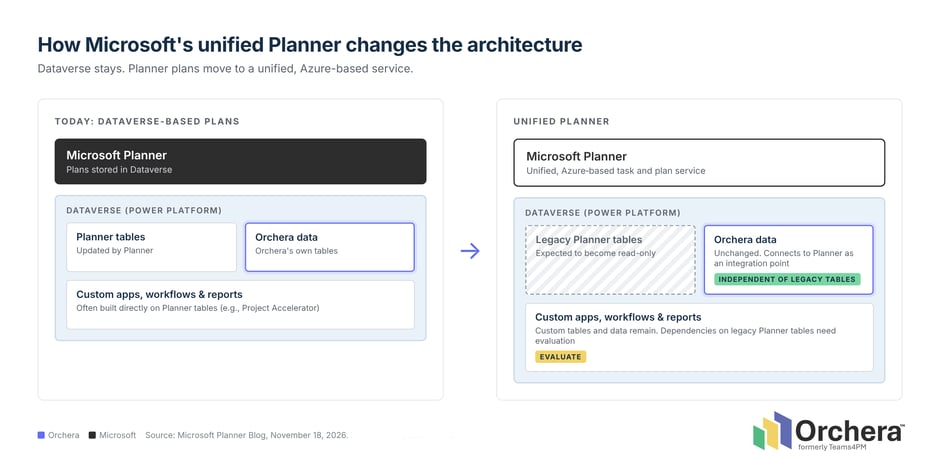
| Planner is moving to a unified, Azure-based service | Dataverse remains part of Microsoft Power Platform |
| Microsoft is no longer investing in Planner Premium | Existing Planner plans in Dataverse remain supported during the transition |
| Integrations built on legacy Planner tables will need to be evaluated | Orchera does not depend on legacy Planner tables |
First, Dataverse is not going away. It remains a core part of Microsoft Power Platform. Existing Power Apps and other solutions built on Dataverse are not being retired by this Planner announcement.
However, organizations that use the Microsoft Project Accelerator or have extended Dataverse-based Planner plans with custom applications, workflows, reporting, or PPM capabilities should understand how the architectural transition may affect their solutions.
As Planner moves to its unified infrastructure, we expect the legacy Planner tables in Dataverse to eventually become read-only. Custom Dataverse tables and business information can remain, but integrations that depend on those Planner tables being updated will need to be evaluated.
This won't happen overnight. Microsoft hasn't yet published migration timing or tooling.
Orchera was architected for this transition.
And it continues to be built for the way Microsoft's platform evolves.
Orchera's data model is independent of Planner's underlying tables. Orchera maintains its own data in Dataverse within the customer's Microsoft tenant, but it does not depend on Planner's legacy Dataverse tables. Instead, Orchera treats Planner as an integration point within a broader work orchestration layer.
This distinction protects the Orchera environment and its business information from the announced architectural change.
Existing Orchera customers do not need to rebuild their Orchera environments because of Microsoft's announcement. Orchera's product roadmap includes updates to support Microsoft's evolving unified Planner services and APIs.
If you're evaluating Orchera, its independent data model means your orchestration layer won't depend on Planner's legacy Dataverse tables. Orchera is available in the Microsoft Teams Store, runs on Microsoft Teams and Power Platform within your own Microsoft tenant, and has completed a SOC 2 Type II audit.
For organizations with existing Planner customizations, the appropriate approach depends on how tightly those solutions are connected to legacy Planner data.
There are three paths worth evaluating:
01
Adapt existing integrations
Update integrations to Microsoft's unified Planner services as supported capabilities become available.
02
Modernize custom PPM applications
Maintain enterprise data and processes separately from Planner's underlying architecture.
03
Evaluate Orchera
Use a governed orchestration layer that brings project execution, data, and people into a standard PPM experience without relying on legacy Planner tables.
The priority is to preserve the value of existing investments while preparing for Microsoft's next generation of work management.
I'm an Orchera customer
No immediate action is required solely because of this announcement. We'll communicate any relevant integration changes as Microsoft's roadmap progresses.
I've customized Planner or used the Project Accelerator
Now is a good time to review your architecture and identify which solutions depend on legacy Planner tables.
I'm evaluating my options
Look for an approach that keeps your enterprise data and processes independent of Planner's underlying architecture.
Orchera solution partners, including Innovative-e and Integent, can help organizations assess their existing implementations and determine a practical path forward.
Talk with an Orchera Solution Partner Explore Microsoft Planner + Orchera →
Based on Microsoft's November 18, 2026 announcement, Introducing unified tasks and plans for Copilot and Microsoft 365, and Orchera's analysis of its impact. Migration details and timelines remain subject to Microsoft's published guidance.

Transition seamlessly from Microsoft Project Online to Project for the Web with our comprehensive guide on planning, support, and leveraging...

Discover how AI in project management with Microsoft Teams streamlines, reduces risks, and boosts efficiency, transforming your workflow and...

Discover how using project workflow automation with the Microsoft Power Platform can streamline processes, enhance productivity, and drive growth.